

File Naming Conventions for Individuals and Teams
Have you ever lost a file or wanted to reference a document you created months ago? If you have a consistent file naming system, chances are you were able to call it up in a quick search. If you don’t, I’m going to guess you abandoned your search, asked a colleague for help, or started over.
As the first blog post, it makes sense to start with something super basic. When collaborating, it also makes sense to talk about file naming conventions with your team before going into full-throttle-work-mode. This protects version control and ensures people know where to find what they’re looking for.
Even if your files are never seen by anyone except you, establishing a consistent file naming convention will make your life easier. I promise.
Filenaming 101
Filenames should follow a few simple rules:
- Keep it simple, easy to maintain, and use them consistently
- Timestamps should be in this format: YYYYMMDD
- Use abbreviations and acronyms
- Use 30 characters or less
- Use of CamelCase – Like Title Case, CamelCase capitalizes the first letter of each word and does not use spaces between words
- Use underscores and dashes to separate categories, not spaces
- Files should start with the largest level or classification (i.e., the organization name) and end with the smallest level or classification (i.e. the date or version)
Filenaming Taxonomy
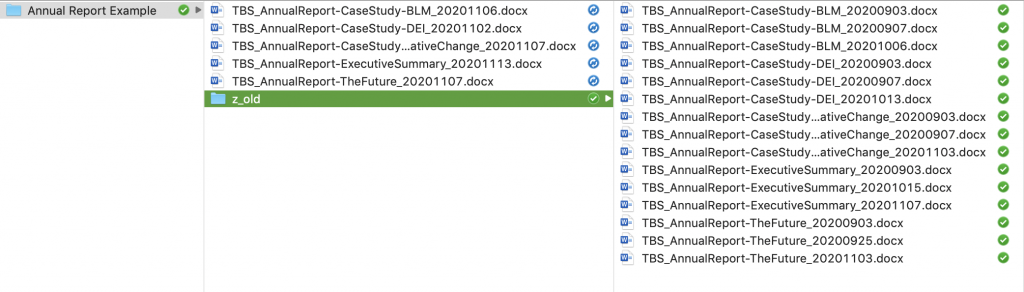
My file taxonomy usually starts with the largest classification and ends with the smallest classification. Think of your finder window as a table of contents for your work. When files are named largest-to-smallest, they sort into clean categories automatically. Mix up that order, and the finder becomes a pile instead of a shelf. For example, all of the files I create start with the client acronym. This never changes and is consistent across every single file I create for that client. What changes most is the timestamp or version number. That goes last.
TBS_AnnualReport_CaseStudy-ClimateMigration_20210205.docx is an example of what a good file name looks like. When I look at this file, I can easily see who the project was for (The Bridge Studio), what the project name is (Annual Report), any specifics that fall under the project classification (CaseStudy-ClimateMigration), and the day it was last edited (February 5, 2020). This is especially important when working on a project with many components (e.g., a publication or film project).
Timestamps – There’s really only one way
(Hint: YYYYMMDD)
This is a simple life hack. The timestamp should be a series of 8 numbers that start with the 4-digit year and ends with the 2-digit day (e.g., YYYYMMDD). If timestamps are written as DD-MM-YYYY, MM-DD-YYYY, or the timestamp is spelled out they get mixed up like dirty socks in the hamper.
Computers automatically sort files based on numerical values. If everything preceding the timestamp is the same, then the most recent version of the file will be very easy to locate.
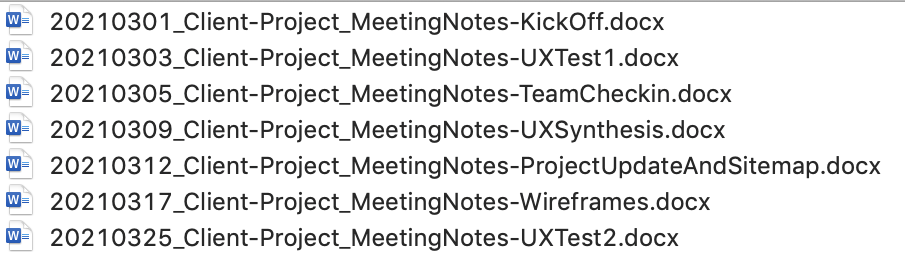
When I have a running log of recurring meeting notes or presentations for a project, I start my file names and presentations with the date. Not only does this make it easy to find the latest file, but it also creates a really beautiful timeline of what the team has been working on.
When file naming conventions have saved the day
- My colleague lost their file – This happened recently, and it felt great to help a friend out. Wayne shot drone footage for a documentary I produced FOUR YEARS AGO. There was a great shot of elk running through a field — a once in a lifetime shot! But he couldn’t find it on his system anywhere. It took a few minutes to locate the hard drive and run a quick search for “elk”. Voila! there it was. This was possible because, when I batch-named all the files, I went back and included “elk” in the filename for this particular series.
- Who took this picture? Is this picture even in America? – I work in climate change action and have seen a LOT of scenic landscape shots from around the world. It’s not always clear if a picture of a windmill and farmlands is in America, Germany, or who knows where. When the file is named properly, all of that information will automatically move with the file in the file name. If managing a centralized photo library for your organization, this is invaluable. It ensures your staff can quickly pull up a relevant shot, from the right location, and know exactly who to attribute.
- VERSION CONTROL! – I have a personal preference for defaulting to timestamps, not version numbers with my file names. If I’m working with a team on a file and it says TBS_AnnualReport_ExecutiveSummary-v2.docx, that’s nice… If it says TBS_AnnualReport_ExecutiveSummary_20170813.docx I can immediately see we’re working off of the wrong file (from the wrong year or week).
The system only works if you’re consistent and your whole team uses it. So before you implement anything, have the conversation. Fifteen minutes now will save you hours of “wait, which version is this?” later.

Michelle Fox is a communication designer, and the director and founder of The Bridge Studio. She has been working for and with purpose-driven organizations since 2006. A Virgo sun, Virgo moon, Michelle LOVES when things are organized and orderly.